

To test, use a Sandbox API key, and see Test in the Sandbox.
What an evidence pack holds
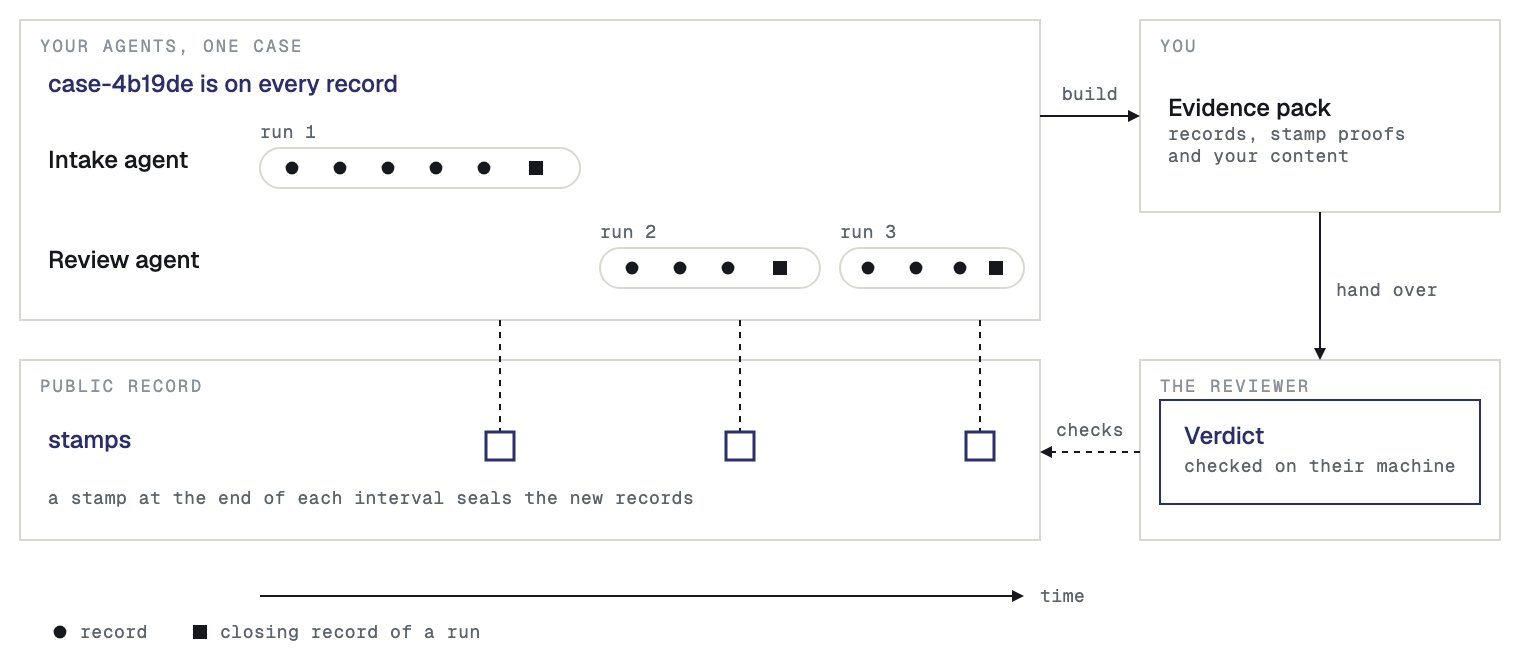
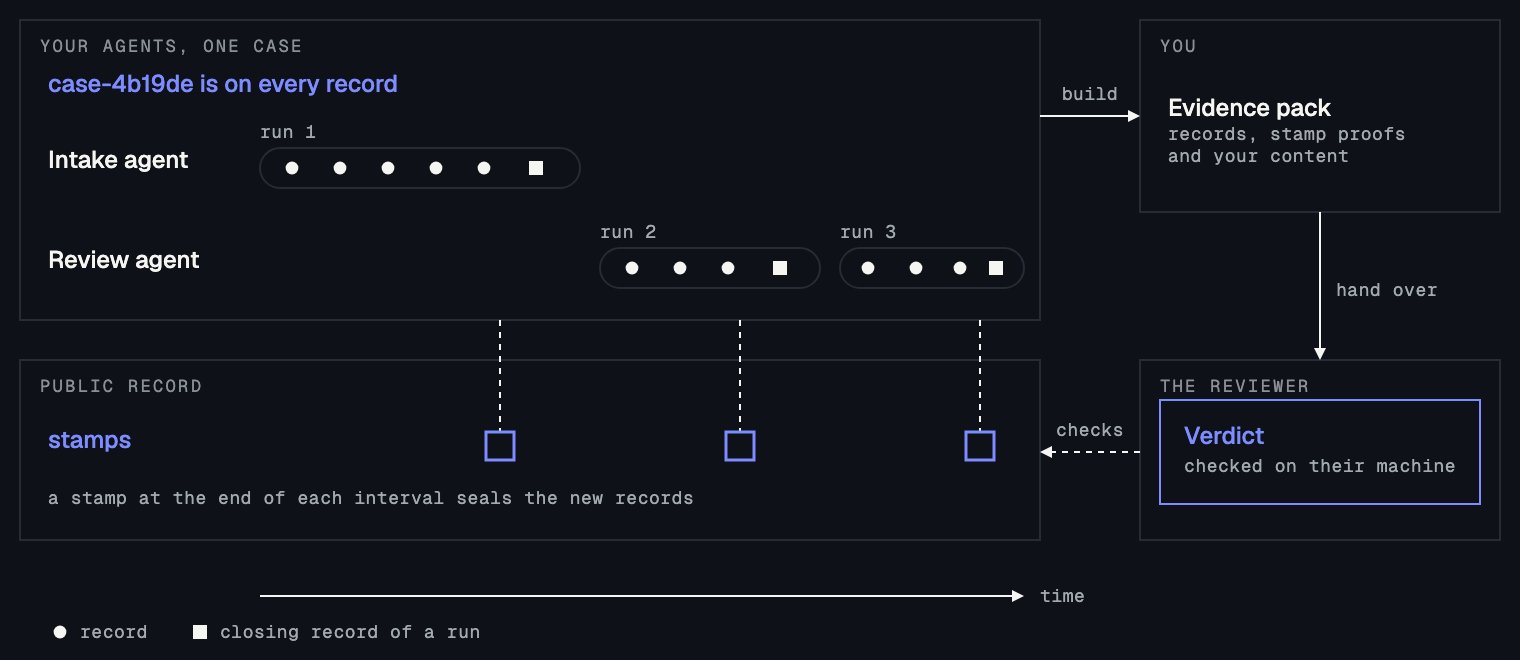
An evidence pack (defined in the Introduction) joins two halves. Sanning holds the signed records and the proofs that stamps cover them. You hold the content that the records hold hashes of, in your log store. Sanning never receives that content, so only you can put the halves together. The pack is one zip file:bundle.json: the signed records, and for each record the proof that a stamp on the public record covers it.logs/: your content, one file for each record.
Keep your content
The log store holds the content that your records hold hashes of. Sanning holds hashes only, so if the store is lost, the pack cannot carry the content, and no one can rebuild it. A reviewer can still check the signatures and the stamps without the content, but not what the records said. Set up the log store before your agents record, because the adapter writes each step’s content to the store as it records. The steps and the permissions are in Set up your log store.Wait for the stamp
A pack needs the stamp proofs. Sanning seals the records of each 10-minute interval, and the proofs are ready about a minute later. The public record can take longer to confirm a stamp, sometimes hours. A Witness strip at the top of the console’s Records page shows the block time of the latest stamp, which is the time the public record confirmed it. The page does not mark a single record as stamped, so the test isbundle, the command that builds the pack. It exits with code 2 in both of these cases, and you run it again later:
- Records are not stamped yet.
bundlewrites nothing and says how many records are waiting for a stamp. Your records are not missing. - The stamp exists and the public record has not confirmed it.
bundlewrites the pack, the pack reads Incomplete, and the verifier says that the stamp names no public record.
Build the pack
Install the SDK where you runbundle. Reading an S3 log store needs the S3 library in TypeScript and the s3 extra in Python, the same as the Quickstart:
bundle somewhere that can reach your log store, with your signing seed in the environment. The command reads your records from Sanning with your API key, reads the content from your log store, and checks the result the way a reviewer will before it writes anything. If the pack would fail the check, the command writes nothing.
API_KEY: the Live API key from the Quickstart. It already has the scopeanchor:readthatbundleneeds.SEED: the seed of the agent in--agent. With the seed,bundlesigns a declaration, which is the pack’s own statement of which records it holds, so that the reviewer can check the pack against it. Without the seed, the pack carries no declaration.ENDPOINT: the address of your S3 service, such ashttps://s3.us-east-1.amazonaws.com. AddSANNING_S3_REGIONif the bucket is not inus-east-1.ACCESS_KEY_IDandSECRET_ACCESS_KEY: credentials that hold thebundlepermissions in the next paragraph.claims-triage: the agent ID of your agent.case-4b19de: your case ID.s3://evidence-claims: the S3 URL of your log store, writtens3://BUCKET, ors3://BUCKET/PREFIXfor a prefix inside it.
bundle credentials need s3:GetObject and s3:PutObject on arn:aws:s3:::BUCKET/*, and s3:ListBucket on arn:aws:s3:::BUCKET. Replace BUCKET with the name of your bucket.
bundle reads only the SANNING_S3_* variables for the log store. It does not read the AWS_* variables or the AWS credential chain that the Quickstart used, so give the SANNING_S3_* variables the same values as your AWS ones.
A case pack takes no dates. It holds every record of the case that this agent recorded, however long the case ran. The command keeps a record only when its own signed case ID is the one you name, so a record that carries no case ID is not found. This is why every run must record with a case ID.
The command exits with the code that the verifier would give the pack. The codes are in Command line.
What bundle sends to Sanning
When the pack carries a declaration and reads Verified,bundle records the declaration as a record of its own, so that a later pack for the same case is visibly later. Each time it writes a pack, bundle also sends Sanning a pack report: the agent, the environment, the period, the record count and a hash of bundle.json. The pack report never holds the pack, a log or a file name. You find it under Evidence in the console.
When several agents worked on the case
Give--agent once for each agent, and put each agent’s seed in SANNING_SIGNING_SEEDS. The command then builds one pack for each agent, and writes them together as a case file, a zip that holds one pack for each agent.
INTAKE_SEED_VALUE and REVIEW_SEED_VALUE with the seeds of the intake and review agents. Each is that agent’s own signing seed, the one its anchorer signs with.
Each pack is signed by its own agent’s signing key, and nobody signs the case file as a whole. The zip holds each pack under packs/AGENT_ID/ (the agent ID of its agent), an unsigned index named contents.json, and a HOW-TO-VERIFY.txt. Every agent that you name must have a pack, or the command writes nothing. If one agent’s records are not stamped yet, the command exits with code 2, and you run it again later.