

Check it in your browser
Open verify.sanning.io and drop the zip file on the page. The check runs in your browser and the pack is never uploaded: the only data that leaves your browser is the public record ID of each stamp. The page looks the stamps up through a Sanning server, and it has no setting to change that. For a check with no Sanning server in it, use the command line with--gateways and a public gateway.
Check it at the command line
Unzip the pack, and run the verifier onbundle.json. --logs points at the folder that holds the content.
--gateways with the address of a public gateway. Without --gateways, the report says Witness: Not checked, and the skipped lookup does not change the verdict. The lookup is the one network call the verifier makes.
case, which takes the zip file and prints one verdict for the case.
What the verifier checks
The verifier is the program that checks a pack. The verify page and both command lines run the same core, the kernel, which ships as@sanning/proof for TypeScript and sanning-proof for Python.
The report states six claims: Signed, Unchanged, Witnessed, Complete, Agreed and Follows the rules. Each claim is proven, disproven or not proven, or it is not in scope. The text report leaves out a claim that is not in scope. One rule turns the claims into the verdict: if any claim is disproven, the verdict is Failed; otherwise, if any claim is not proven, it is Incomplete; otherwise, it is Verified. Every check except the optional stamp lookup runs on your machine.
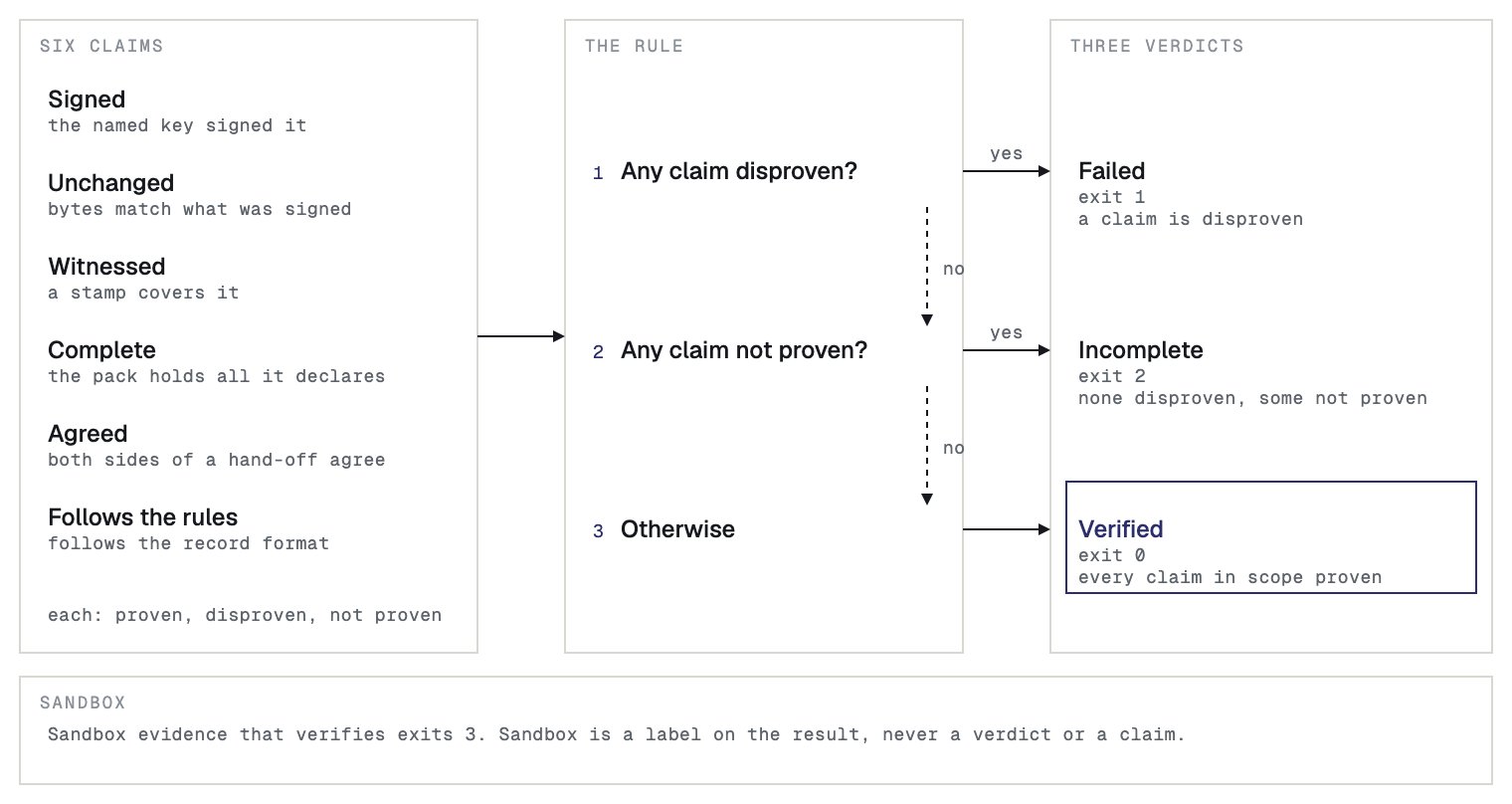
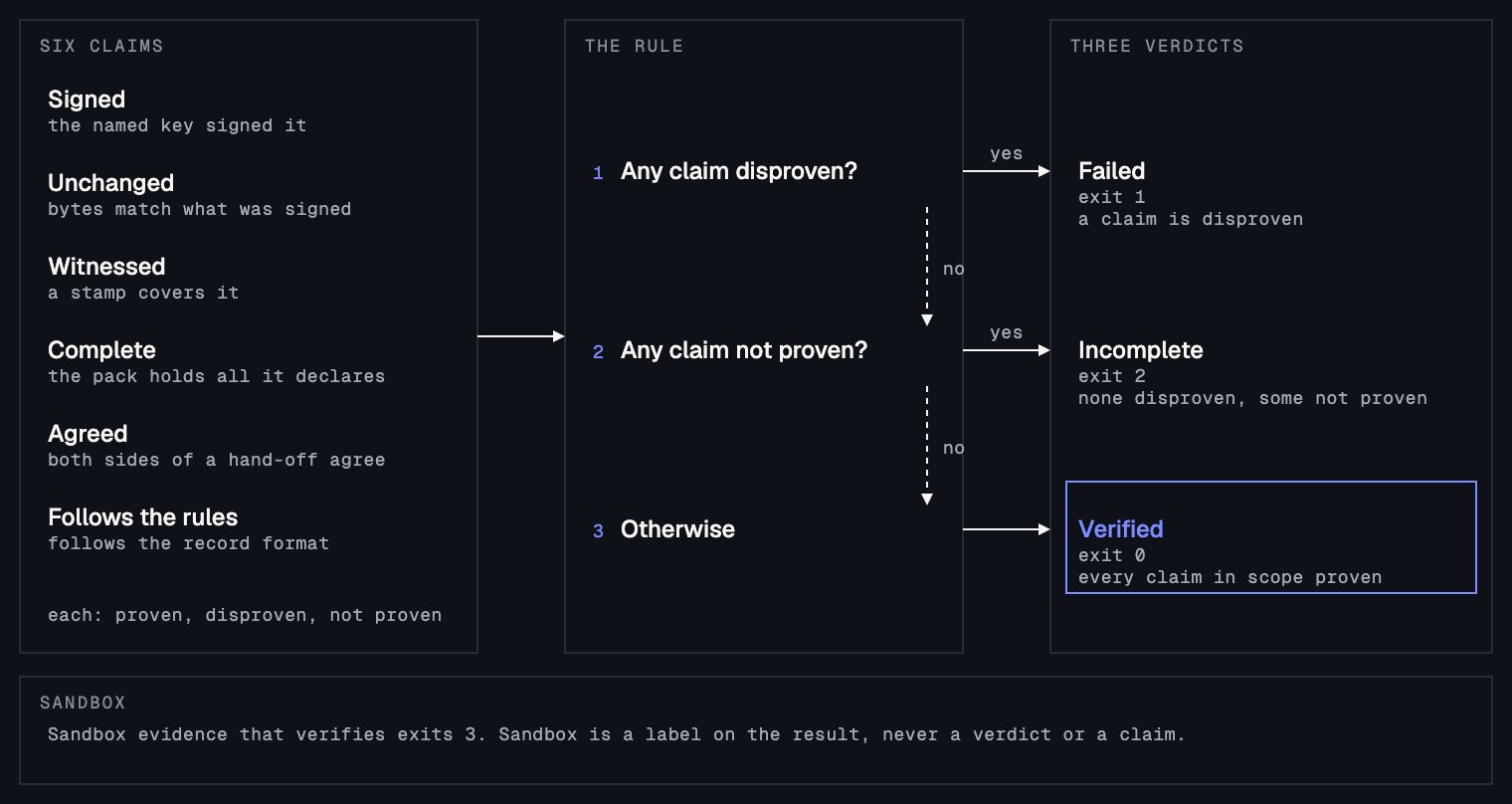
What each verdict means
The first line of the report is the verdict.
An Incomplete verdict means that nothing is disproven and the pack leaves something out, such as the content of a record, or a stamp the public record has not confirmed yet. The report says which, and a
Next: line says what to do. Ask the sender for what is missing, or check again later.
After the verdict come one line for each claim that is disproven or not proven, and a Next: line when there is something to do. The report can also hold these lines:
Note:for something to know that does not change the verdict.Sandbox:when the records were made with a Sandbox API key.Witness:always, to say whether the stamps were looked up on the public record. It readsConfirmed on the public record,Not checked, orThe public record holds different bytes.
What Verified proves
A Verified verdict proves the following:- The records are the ones the agent signed with its signing key.
- None changed after it was signed.
- Each record follows the record format.
- Each run’s records are complete and in order.
- Stamps cover the records.
--gateways and a public gateway, Verified also proves that the public record holds them. The public record is the independent witness: it fixes when the records existed, and neither the sender nor Sanning can change that afterward without the check failing. Without the lookup, the report says Witness: Not checked, and Verified does not prove when the records existed. On the verify page, the lookup goes through a Sanning server.
What Verified does not prove
A Verified verdict does not prove the following:- That the agent decided well, or that what the records say is true. A record proves what the agent recorded, not that it was right.
- That the agent recorded every step. The first record of each run lists what the adapter cannot capture. Read it.
- That the pack holds every run of the case. A pack holds a selection of records, and the declaration inside it is the sender’s own statement of what it holds.
- Who holds the signing key. A key proves that the same key signed the records, not who the person or organization behind it is.
- That the agent followed a rule or a law. Those conclusions belong to the people who review the evidence.